2025 — сейчас · продукт и дизайн2025 — now · product & design
Одна и та же просьба. Обычный ai-чат отвечает текстом, и действовать приходится в другом приложении. Memory AI отвечает карточкой: напоминание уже создано и открывается одним касанием.The same request. A typical ai chat answers with text, and you act in another app. Memory AI answers with a card: the reminder already exists and opens with one tap.
Memory AI — персональный ai-ассистент для iPhone. Он помнит контекст, ведёт задачи и календарь, напоминает о важном и помогает готовиться к встречам.
Memory AI is a personal ai assistant for iPhone. It keeps context, runs your tasks and calendar, reminds you of what matters and helps you prepare for meetings.
Я отвечаю за продукт и дизайн: концепцию взаимодействия, виджеты в чате, дизайн-систему, публикацию в App Store и маркетинг.
I’m responsible for product and design: the interaction model, in-chat widgets, the design system, the App Store release and marketing.
Напоминания без формReminders without forms
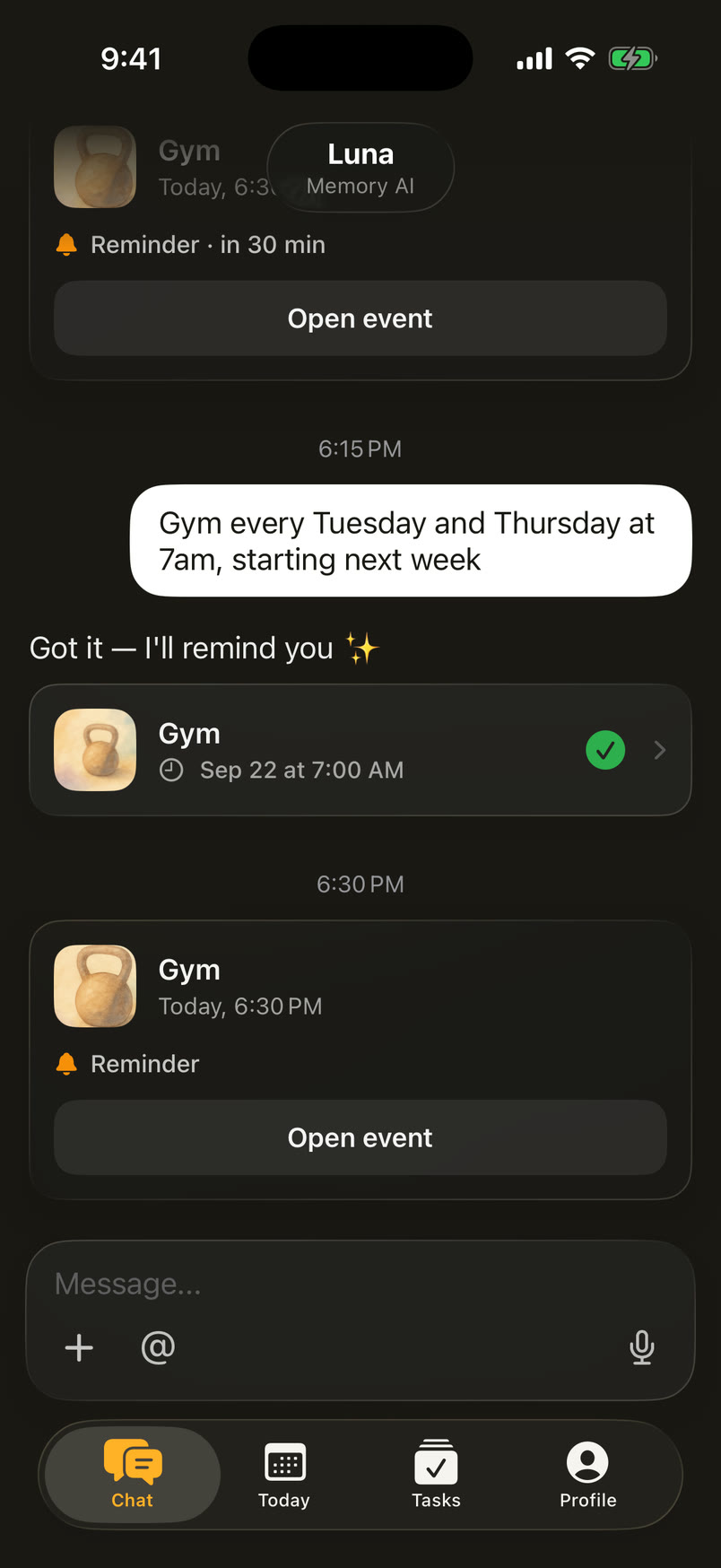
В большинстве приложений напоминание — это форма: название, дата, время, повтор. В Memory AI формы нет. Пользователь пишет так, как сказал бы человеку, а ассистент разбирает фразу и отвечает карточкой прямо в чате.
In most apps a reminder is a form: title, date, time, repeat. Memory AI has no form. You write the way you’d tell a person, and the assistant parses the sentence and answers with a card right in the chat.
Карточка сразу показывает, что понял ассистент: тему и время. Галочка значит, что напоминание уже создано, а касание открывает его. Ошибку видно до того, как напоминание сработает.
The card shows what the assistant understood: the topic and the time. The check mark means the reminder already exists, and a tap opens it. A mistake is visible before the reminder ever fires.
Задачи, которые работают самиTasks that run on their own
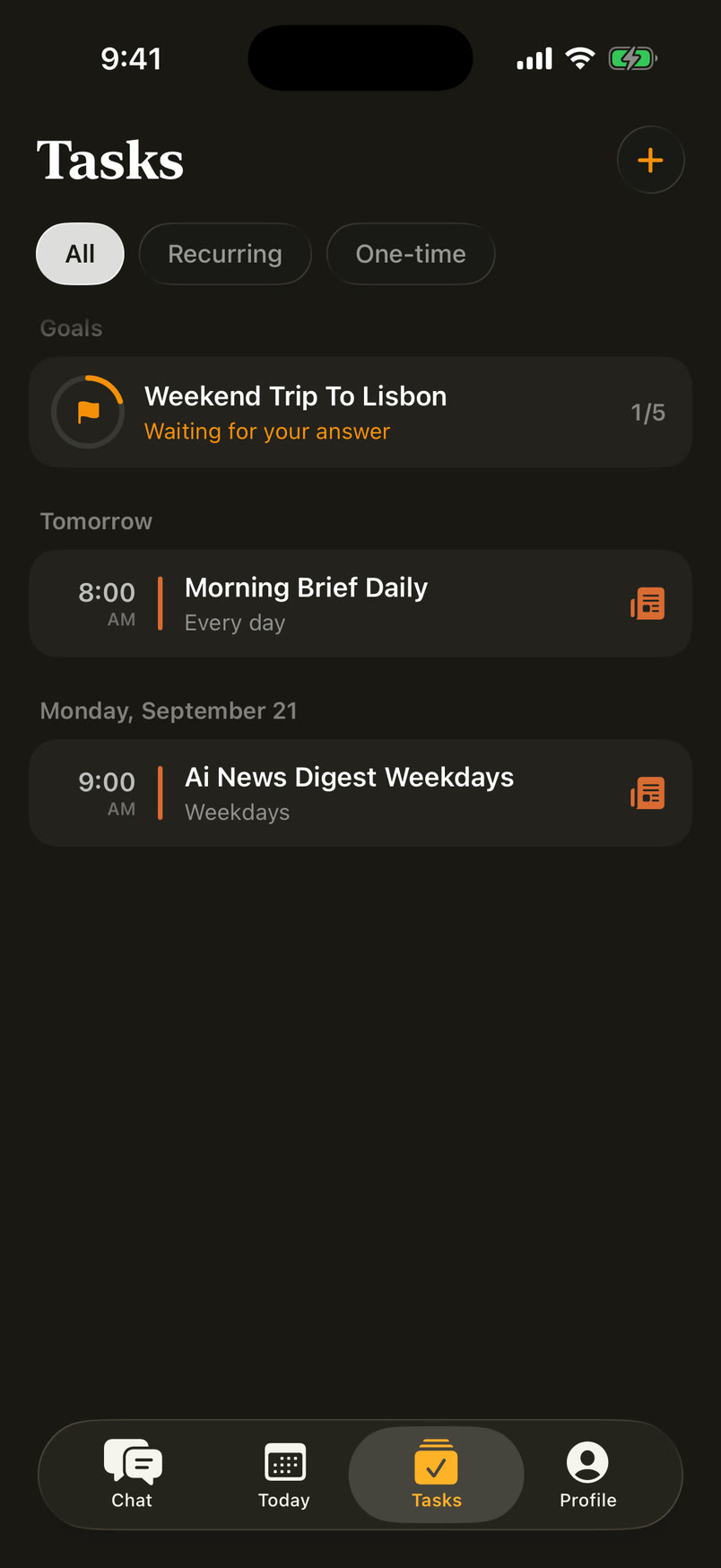
Обычный чат отвечает, только когда его спросили. В Memory AI просьбу «делай это каждое утро» ассистент превращает в задачу: она появляется в чате карточкой и во вкладке Tasks, а дальше запускается сама.
An ordinary chat only answers when asked. In Memory AI, “do this every morning” becomes a task: it shows up in the chat as a card and in the Tasks tab, and from then on it runs by itself.
Результат приходит в тот же диалог: строка о запуске задачи и ответ с виджетами, например лентой дня.
The result lands in the same conversation: a line saying the task started, then an answer with widgets, like the day’s agenda.
Одна и та же просьба про утро. Обычный чат в 9:00 молчит. Memory AI сам запускает задачу и присылает сводку с лентой дня.The same request about mornings. At 9:00 the ordinary chat stays silent. Memory AI runs the task and sends a briefing with the day’s agenda.
Виджеты внутри чатаWidgets inside the chat
Ответ не обязан быть текстом. Погода приходит карточкой с прогнозом, статистика — графиком, а черновик поста в X — карточкой с кнопками. Действие происходит в диалоге, без перехода на другие экраны.
An answer doesn’t have to be text. Weather arrives as a forecast card, stats as a chart, and a draft X post as a card with buttons. You act inside the conversation, without jumping to other screens.
Обычный чат пишет текст, который нужно скопировать и опубликовать самому. В Memory AI через «@» выбираешь X и действие, получаешь карточку поста в разметке X и публикуешь её прямо из чата.An ordinary chat writes text you copy and post yourself. In Memory AI you pick X and an action with “@”, get a post card laid out like X, and publish it right from the chat.
Записи встречMeeting recordings
Встречу записывает само приложение, а созвоны из Zoom приходят расшифровкой с именами говорящих. Дальше с записью можно разговаривать: спросить, кто что обещал, и получить не пересказ, а сами слова.
The app records the meeting itself, and Zoom calls arrive as transcripts with speaker names. Then you can talk to the recording: ask who promised what and get the actual words, not a retelling.
Ответ — карточка цитаты: откуда, кто и когда сказал, кнопка, чтобы послушать этот момент, и что стало с обещанием.
The answer is a quote card: which meeting, who said it and when, a button to listen to that moment, and what happened to the promise.
Один и тот же вопрос о вчерашней встрече. Обычный чат просит расшифровку. Memory AI отвечает цитатой из записи с именем, временем и сроком.The same question about yesterday’s meeting. An ordinary chat asks for a transcript. Memory AI answers with a quote from the recording, with the name, the time and the due date.
Календарь рядом с чатомA calendar next to the chat
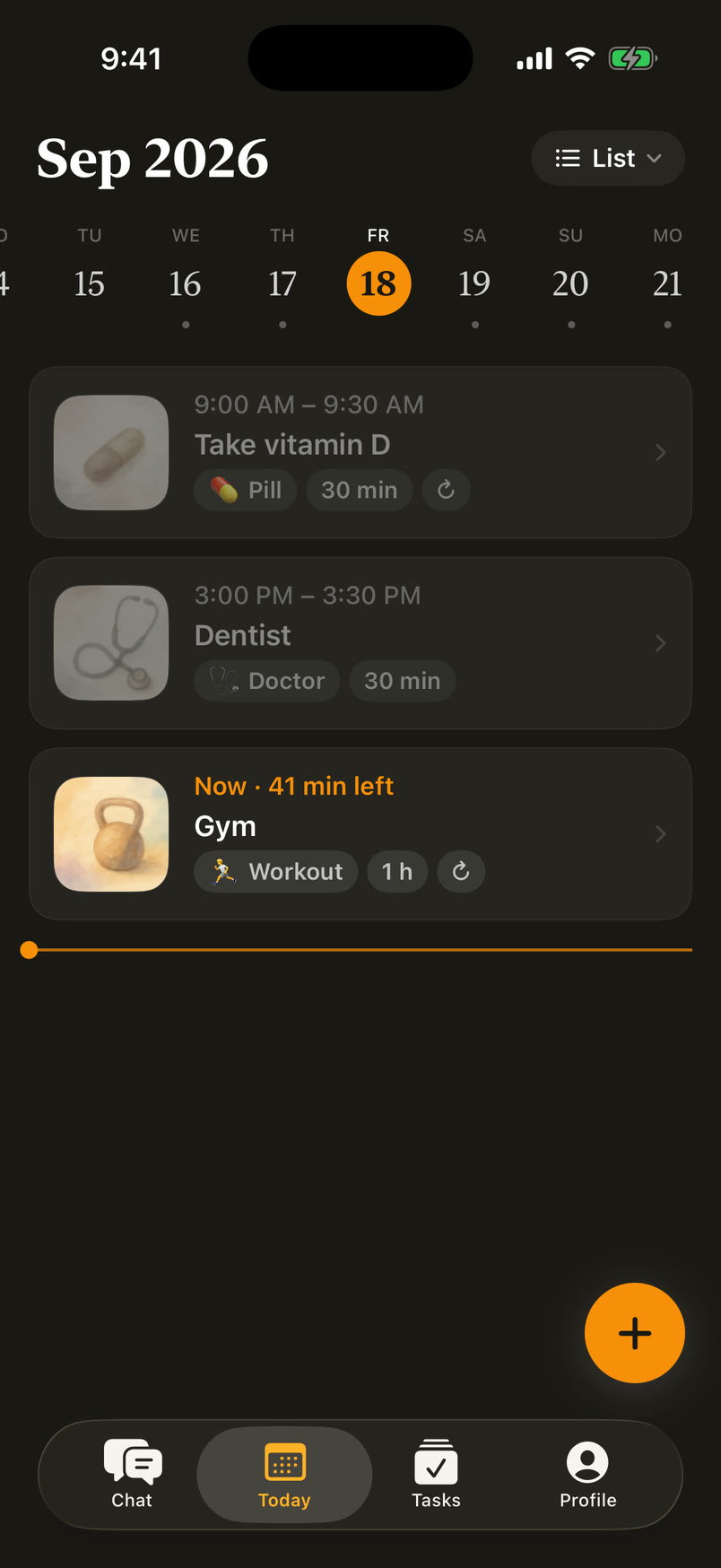
У обычного ai-чата нет календаря: договорённости остаются строками в переписке. В Memory AI всё, что создано в чате, живёт на вкладке «Сегодня»: встречи, напоминания и задачи в одной ленте дня, с акварелью категории, временем и длительностью.
An ordinary ai chat has no calendar: plans stay as lines in the conversation. In Memory AI everything created in the chat lives on the Today tab: meetings, reminders and tasks in one day feed, with the category watercolour, time and duration.
Один и тот же вопрос о четверге. Обычный чат просит перечислить дела. В Memory AI ответ в чате, а сам день — во вкладке «Сегодня».The same question about Thursday. An ordinary chat asks you to list your plans. Memory AI answers in the chat, and the day itself is on the Today tab.
Как устроен агентHow the agent works
Под капотом — агент на Claude. На каждый ход сервер собирает контекст: последние ≈6 тысяч токенов ленты, сводку всего, что было раньше, память о человеке и календарь.
Under the hood is an agent built on Claude. Every turn the server assembles context: the last ≈6 thousand tokens of the feed, a summary of everything before that, memory about the person and the calendar.
Claude отвечает JSON-ом: в нём текст для человека и команды для сервера — создать событие, найти встречу, поискать в вебе. Если нужен инструмент, сервер выполняет его и отдаёт результат на второй проход. Виджеты из ответа приложение рисует нативными карточками.
Claude answers in JSON: text for the person and commands for the server — create an event, find a meeting, search the web. When a tool is needed, the server runs it and hands the result back for a second pass. The app draws the widgets from the answer as native cards.
Слева то, что видит человек. Справа — разговор сервера с Claude в ту же секунду: контекст хода, JSON-ответы, поиск по встречам вторым проходом и напоминание, которое воркер присылает сам.On the left, what the person sees. On the right, the server’s conversation with Claude in the same second: the turn’s context, JSON replies, a meeting search as a second pass and a reminder the worker sends by itself.
Одна системаOne system
Экраны приложения и виджеты в чате собраны из одних компонентов: карточки, чипы, кнопки, списки. Цвета и типографика заданы токенами для светлой и тёмной темы, поэтому новый виджет выглядит родным с первого дня.
App screens and chat widgets are built from the same components: cards, chips, buttons, lists. Colour and type live in tokens for light and dark themes, so a new widget feels native from day one.
Пример — карточки в чате. Событие, фоновая задача и сработавшее напоминание устроены по одной анатомии. Строка, которую можно открыть, лежит на интерактивном стекле с радиусом 16, виджет — на спокойном с радиусом 18.
Take the chat cards. An event, a background task and a fired reminder share one anatomy. A row you can open sits on interactive glass with a 16 radius, a widget on calm glass with 18.
Событие, фоновая задача и напоминание: разный смысл, одни метрики. Выберите параметр, и он подсветится во всех трёх карточках.An event, a background task and a reminder: different meaning, the same metrics. Pick a property and it lights up in all three cards.
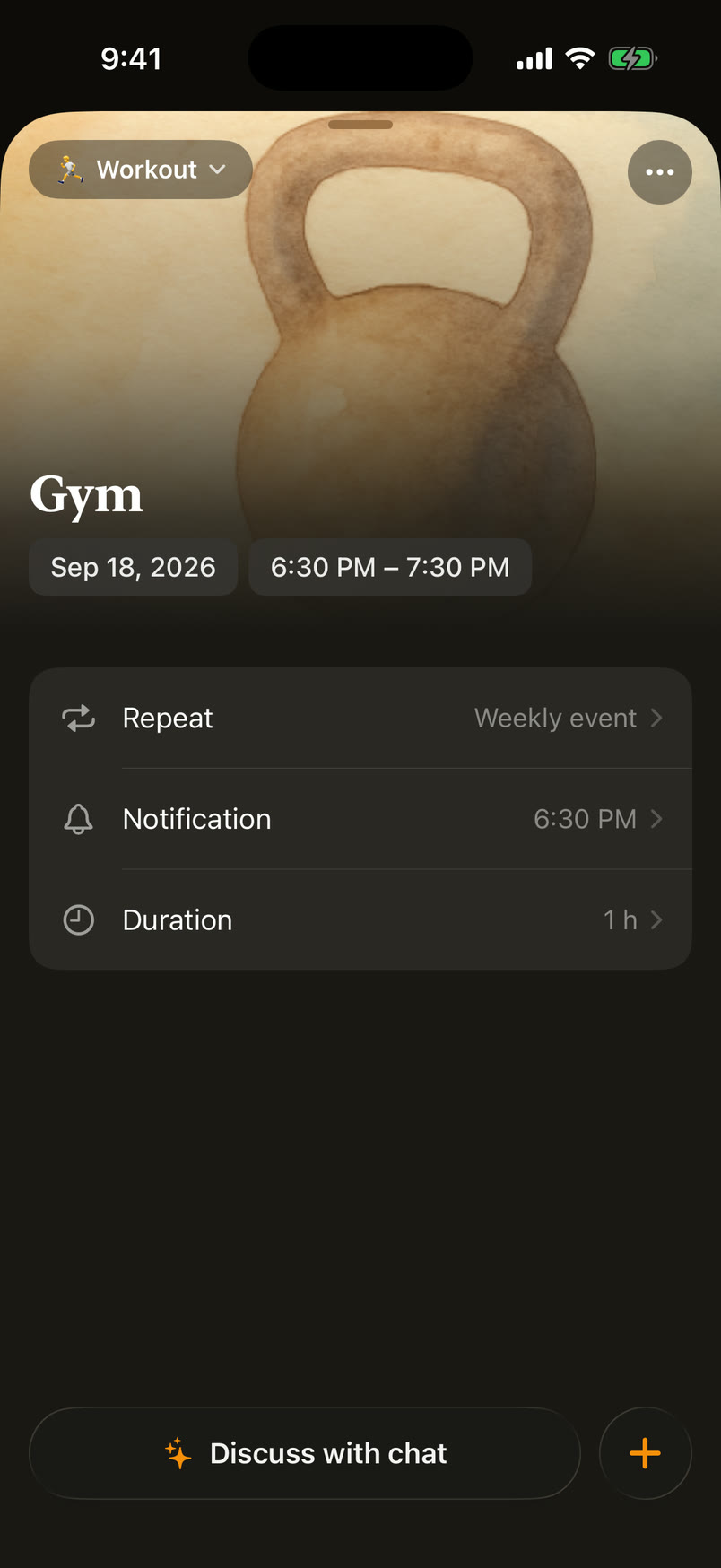
У каждой категории событий своя акварель. Категорию выбирает агент, а картинка встречается в чате, в ленте дня и в карточке события, поэтому тренировку или день рождения узнаёшь раньше, чем прочтёшь название.
Every event category has its own watercolour. The agent picks the category, and the picture shows up in the chat, the day feed and the event card, so you recognise a workout or a birthday before you read the title.
meeting
work
presentation
deadline
study
reminder
workout
mindfulness
doctor
pill
birthday
anniversary
family
friends
social
entertainment
hobby
travel
shopping
finance
home
car
personal
23категорииcategories
23 акварели в одной технике и свете. Подписи — ключи категорий, которыми пользуется агент.23 watercolours in one technique and light. The labels are the category keys the agent uses.
Чат: напоминание одной фразой, карточки прямо в лентеChat: a reminder in one sentence, cards right in the feed
Сегодня: лента дня, текущее событие и линия времениToday: the day feed, the current event and the time line
Событие: акварель категории, повтор и уведомленияAn event: category watercolour, repeat and notifications
Задачи: цели и автоматизации по расписаниюTasks: goals and scheduled automations
Цель: агент ведёт план по шагам и спрашивает, когда нужноA goal: the agent works through the plan and asks when it needs you
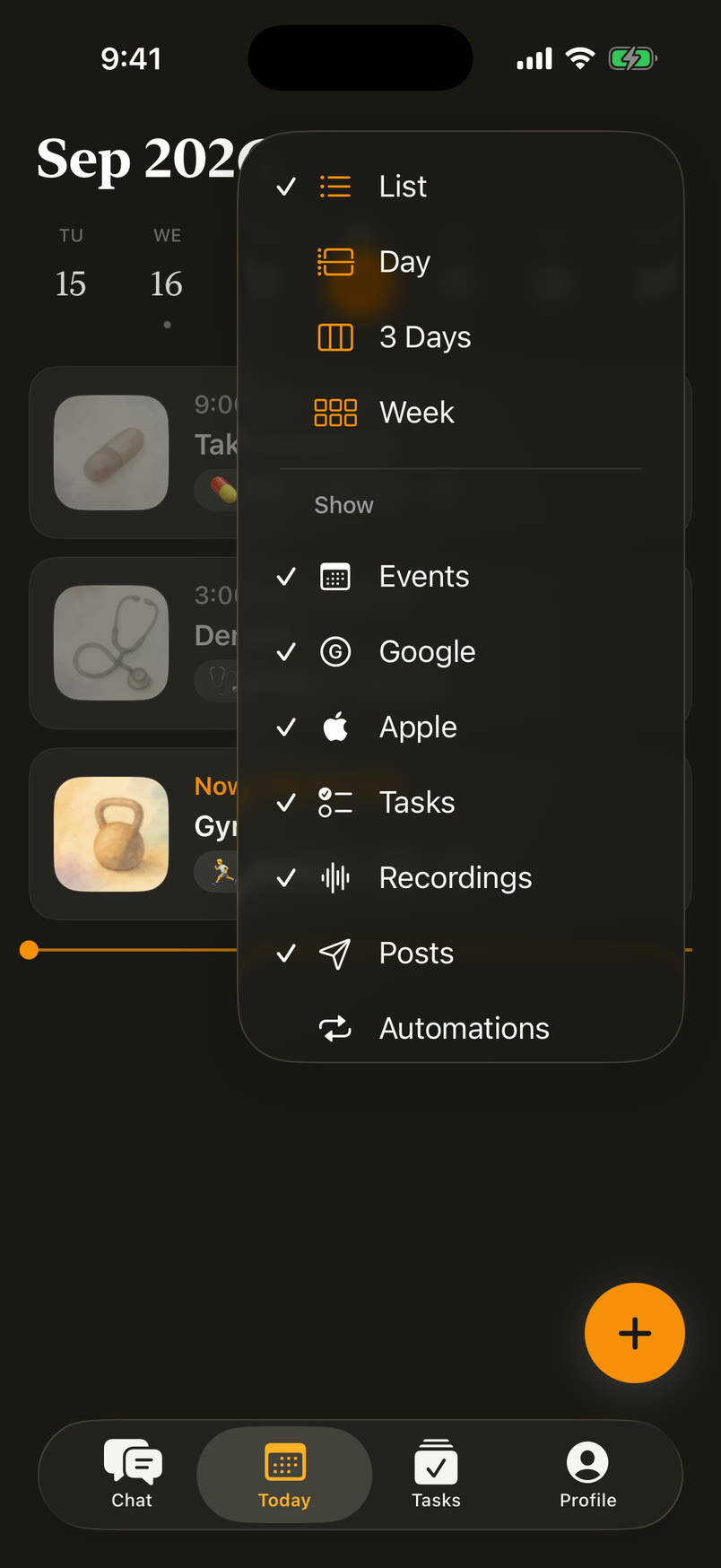
Режимы и слои календаря: встречи, задачи, записи, постыCalendar views and layers: events, tasks, recordings, posts
Настоящие экраны: демо-аккаунт на текущей сборке приложения.Real screens: a demo account on the current build of the app.
ЗапускLaunch
Я подготовил публикацию в App Store: страницу приложения, скриншоты и маркетинговые материалы. Сайт — appmemory.io.
I prepared the App Store release: the product page, screenshots and marketing materials. Website: appmemory.io.